




Please add your Exclusive tool4seller Email Address using the main account in Amazon Seller Central to ensure we can send and receive emails for you in time.
1.Copy the Exclusive Email Address and add it to each marketplace associated with the Seller ID.

2. Please go to the corresponding Amazon Seller Central, and add a dedicated email address for tool4seller with your primary account.
Note: You are about to redirect to the Amazon Seller Central. Please note that your online environment is consistent with the network environment in which you normally operate the store, so as to avoid account association.

3.After logging in to your main Amazon account, click on "Notification Preferences" under the settings menu to configure the settings.
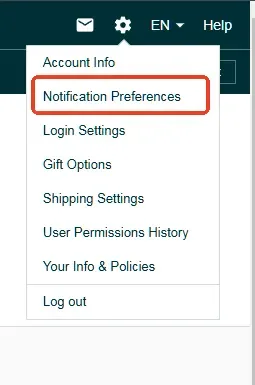
4.Click 'Edit' in the Message Options and add your exclusive email address.

5.After adding the email address, it will be synced to the email authorization page.Please do not delete it.

6.After completing the above steps for all marketplaces under the current Seller ID, please click the "Finish" button below.