




Amazon advertising decisions often start with a question: Which campaigns need attention? What are shoppers searching for? Which bids or budgets should you review?
With tool4seller MCP, you can explore those questions in ChatGPT or Claude using your authorized Amazon business data. Now, tool4seller MCP also supports Amazon Ads queries and selected advertising actions. You can move from reviewing performance to preparing a change, checking exactly what will happen, and confirming it before it is applied.
You can use these workflows on desktop or in the ChatGPT and Claude mobile apps.
Explore your Amazon Ads data in conversation
Instead of switching between reports to investigate a question, you can ask your AI assistant to retrieve relevant advertising data through tool4seller MCP.
Available queries include ad performance, campaigns, ad groups, product ads, portfolios, targeting and negative targeting, search terms, and advertised products that received attributed purchases. You can also look up Amazon targeting recommendations, suggested bids, and bid ranges.
For example, you could ask:
Show me the search terms with the most spend for this campaign over the last 30 days. Which ones should I review?
Or:
Compare the performance of my active campaigns and identify those where spend increased but attributed sales did not.
These are starting points for analysis—not instructions to change your ads. Looking up a suggested bid or a bid range does not create a target or update a bid. A suggested-bid query supports up to 100 targets at a time.
Build an advertising structure step by step
When you are ready to create ads, you do not have to provide every detail in one message. tool4seller MCP supports a step-by-step workflow for creating a campaign, ad group, product ads, and targeting, including bid and negative-targeting settings where supported.
You can begin with the goal and information you already have, then fill in missing details as the conversation continues. If the process is interrupted, you can continue later rather than starting the request from scratch.
For example:
Help me create a campaign for these products. Start by listing the information you need from me.
The AI assistant can help organize the required information and prepare the structure for your review. Creating an advertising object still requires you to inspect the proposed setup and explicitly confirm the action before it is executed.
Prepare changes to existing ads
tool4seller MCP can also help you work through updates to existing advertising objects. Supported actions include adding or adjusting advertising objects and making batch changes to budgets, bids, names, and enabled or paused status.
A request might start with:
Find my active campaigns with the highest spend this week. Prepare a plan to reduce the budgets of the campaigns I select, but do not apply anything yet.
This keeps analysis and execution separate. You can first review the relevant data, decide which objects to include, and inspect the proposed changes.
For bid decisions, you could ask for current bids alongside available suggested bids and bid ranges, then request a change plan for selected keyword or product targets. Those recommendations are inputs to your decision—not a promise of the best bid or a guaranteed advertising result.
Review, confirm, then apply
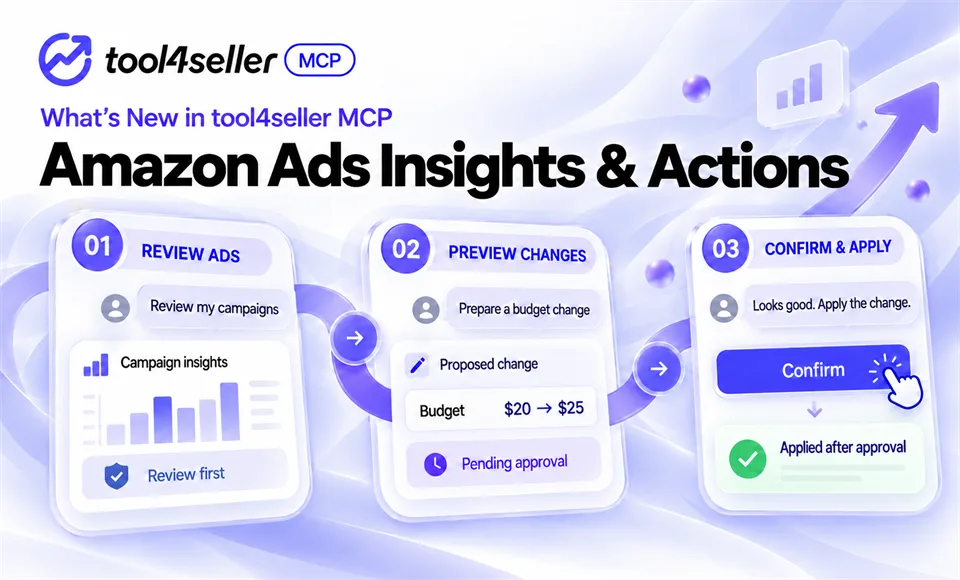
Advertising changes should be easy to inspect before they go live. The tool4seller MCP workflow follows a clear sequence:
- Ask a question or describe the change you want.
- Review the data and the proposed plan.
- Check the specific objects and settings that would change.
- Explicitly confirm the action.
- Apply the confirmed changes.
This matters especially for batch operations. Before execution, you should be able to see what is being changed—such as a campaign budget, a targeting bid, a name, or an enabled/paused status—rather than treating a conversational request as automatic approval.
Query coverage and management coverage are different. Being able to query Sponsored Products (SP), Sponsored Brands (SB), or Sponsored Display (SD) data does not mean every creation or modification action is available for every ad type or object. Check the supported action for the specific task you want to perform.
Work from your phone when you need to
These workflows are not limited to your desk. With tool4seller MCP configured, you can use it in both the ChatGPT and Claude mobile apps to query data and carry out supported advertising actions.

For example, while away from your computer, you could ask for a campaign performance summary, review a proposed budget change, and confirm it from the conversation after checking the details. Or you could start collecting the information needed for a new campaign and continue the setup later.
The phone is simply another way to access the same review-and-confirm workflow. It does not remove the need to check your data or approve changes.
What you need to get started
To use tool4seller MCP, you need to configure the MCP connection and authorize both your tool4seller store and Amazon Ads access. tool4seller MCP is available on Standard and higher plans. User Accounts can access stores that belong to their own account, but cannot access stores assigned or shared by a Primary Account. To access those stores, sign in with the corresponding Primary Account.
tool4seller supports 22 Amazon marketplaces: the United States, Canada, Mexico, Germany, France, the United Kingdom, Spain, Italy, the Netherlands, Sweden, Japan, India, Australia, Poland, Saudi Arabia, the United Arab Emirates, Singapore, Turkey, Brazil, Belgium, Egypt, and Ireland.
There is no separate tool4seller MCP call allowance within an eligible plan. However, availability and usage can still be affected by the connected AI service, Amazon APIs, and other applicable service limits.
If you are new to MCP, start with our practical guide to MCP for Amazon sellers. When you are ready to connect your account, follow the tool4seller MCP setup guide.
Make your next advertising decision with more context
tool4seller MCP brings Amazon business data and supported advertising actions into the AI tools you already use. Ask a question, prepare a plan, review the details, and confirm only the changes you want to make.
Ready to explore tool4seller MCP?
New to tool4seller? Start with a 14-day trial and explore how your authorized Amazon business data can work with a compatible AI assistant. Start your 14-day tool4seller trial
Want to compare available plans and MCP access requirements? View tool4seller plans
Already have an eligible account? Follow the setup guide to configure tool4seller MCP and verify your connection. Read the tool4seller MCP setup guide